
Podcast clip workflow guide
Podcast clips: from source context to social video
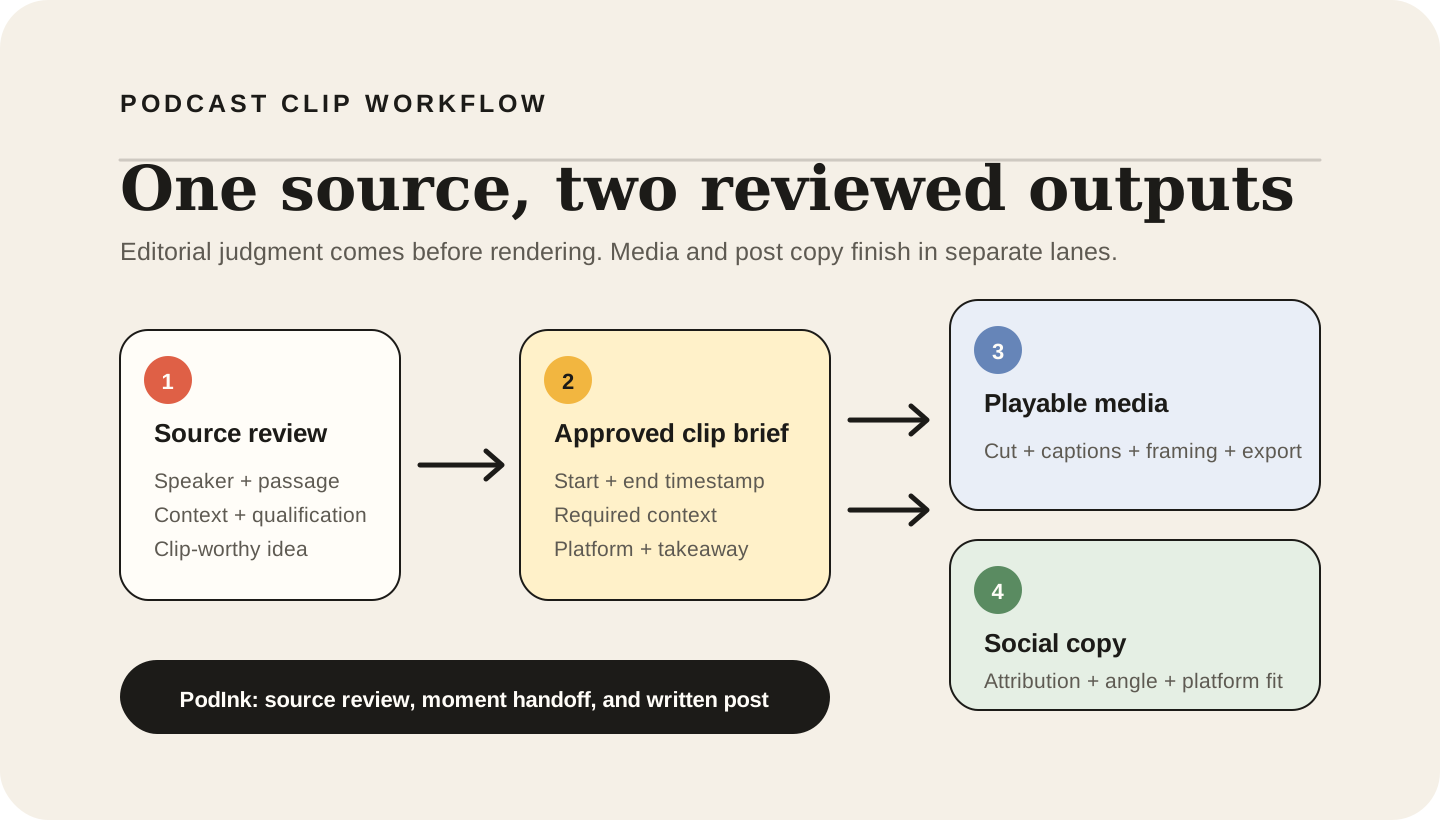
Podcast clips are short audio or video excerpts made from a longer episode for social distribution. A reliable workflow starts before the media edit: find a moment, reopen its surrounding context, confirm the speaker and timestamp, then hand an approved clip brief to a video or audiogram tool.
PodInk contributes to moment discovery, source review, timestamp handoff, and platform-specific writing. A dedicated podcast clip generator or editor still cuts the media, adds captions, reframes the video, and exports the playable file.
Context-first method
How to turn a podcast into social media clips without losing context
Find a moment with a complete idea
Look for a claim, story, disagreement, explanation, or reaction that can make sense outside the full episode. Treat automated highlight scores as candidates for review rather than publishing decisions. Source: Descript's podcast clip workflow.
Reopen the surrounding passage
Read or listen before and after the selected line. Keep any qualification, uncertainty, setup, or response that changes how the excerpt should be understood. Source: PodInk methodology.
Record the speaker and timestamp
Save the speaker, start point, end point, source passage, and intended takeaway. The handoff should let an editor reopen the exact moment without searching the entire episode again. Source: PodInk methodology.
Write an approved clip brief
State why the moment is useful, what context must remain, what must not be implied, and which platform the media is for. The clip brief is the bridge between editorial judgment and video execution. Source: Riverside's platform-format guidance.
Cut, caption, reframe, and export
Use a podcast clip generator or editor to set the media boundaries, correct captions, select the layout, apply branding, and export the playable audio or video file. Source: Headliner's clip production workflow.
Review the media and written post separately
Check the clip for visual and caption accuracy, then review the accompanying X, LinkedIn, TikTok, Reels, or Shorts copy for attribution, claims, and platform fit. Source: Riverside's social distribution guide.
Deliverable map
What counts as a finished podcast clip deliverable?
Podcast clip work contains several deliverables. Keeping them separate makes ownership and review clear, especially when one tool finds moments and another renders media.
| Deliverable | What it must contain | When it is complete |
|---|---|---|
| Moment candidate | A passage, speaker, timestamp, and reason to inspect it | Complete when an editor can reopen the exact source and decide whether the idea survives outside the episode.Source: PodInk |
| Approved clip brief | Start and end guidance, required context, intended takeaway, and target platform | Complete when the media editor knows what to preserve, what to avoid implying, and what output to create.Source: Riverside |
| Exported podcast clip | Playable media with corrected captions, framing, branding, and the required file format | Complete when the file can be reviewed and uploaded to its intended social channel.Source: Descript |
| Social post | Platform-specific copy that introduces or interprets the clip | Complete when attribution, claims, context, and the call to action have been reviewed independently from the media.Source: PodInk |
“A timestamp can start a podcast clip workflow without being the final clip.”PodInk editorial conclusion
Moment discovery, context review, media production, and social writing belong to the same podcast clip workflow, but they are not the same output. PodInk owns the source-review and writing handoff; a clip editor owns the playable media export.
Compare how the approved core changes in the LinkedIn workflow and the X workflow.
Pre-export checklist
What to verify before exporting a podcast clip
- Confirm the excerpt contains a complete idea rather than only a provocative sentence fragment.
- Verify the speaker, start point, end point, and surrounding passage against the original episode.
- Keep qualifications or uncertainty that materially change the speaker's meaning.
- Correct burned-in captions, names, terminology, framing, and branding before export.
- Review the accompanying social copy separately from the media file before publishing.
Workflow boundaries
What a clip-worthy timestamp does not guarantee
- A clip-worthy moment is a candidate, not a finished clip. The final media still needs an approved in-point, out-point, caption treatment, framing, and export.
- An isolated quotation can change meaning when the speaker's setup, uncertainty, or qualification is removed.
- Platform-ready video and platform-ready copy are different deliverables and should be reviewed separately.
- PodInk helps discover and review moments, preserve source context and timestamps, and prepare social copy; it does not cut, render, or publish audio or video.
Human review remains necessary. No repurposing workflow can turn weak evidence into a strong claim.
FAQ
Frequently asked questions
What is a podcast clip?
A podcast clip is a short audio or video excerpt from a longer episode, prepared for discovery, promotion, or discussion on another channel. A finished clip is playable media; a timestamp or transcript quote is an upstream input rather than the final file.
How do I clip a podcast for TikTok, Reels, or YouTube Shorts?
Choose a moment that survives outside the episode, verify its surrounding context and timestamp, create a clip brief, then use a media editor to cut the segment, correct captions, reframe it for the destination, and export the video. Review the post copy separately.
What is the difference between a podcast clip and an audiogram?
A podcast clip is the broader category of short playable media from an episode. An audiogram is usually an audio excerpt presented with visual elements such as artwork, a waveform, and captions; a video podcast clip can instead use the original camera footage and speaker framing.
Does PodInk generate podcast clips?
PodInk helps identify and contextualize clip-worthy moments, preserve speakers and timestamps, and prepare platform-specific written posts. It does not cut, render, export, schedule, or publish the final audio or video clip.
Evidence