Podcast workflow guide
Podcast tools for the full workflow
Podcast tools are not limited to microphones and audio editors. A complete stack can help plan an episode, record and edit it, host and measure it, promote it with clips, and repurpose its strongest ideas after publication.
Choose one tool for the bottleneck you have now. PodInk belongs to source review and repurposing: it helps identify clip-worthy passages, preserve the speaker and timestamp, and prepare separate X and LinkedIn drafts. It does not record, host, cut, or export the episode.
Stack design
How to build the smallest useful podcast tool stack
Name the missing output
Write down the artifact you cannot produce reliably today: a guest brief, clean audio, an RSS feed, an analytics report, a playable clip, or a reviewed post. The category becomes clearer when the output is explicit. Source: Descript's full-workflow tool guide.
Choose the specialist for that stage
Recording, editing, hosting, analytics, promotion, and repurposing have different responsibilities. A broad product suite is useful only when its output satisfies the next stage. Source: PodRewind's category directory.
Check the handoff
Preserve the source files, speaker labels, timestamps, captions, and export formats required downstream. A fast tool can still create rework if the next stage cannot inspect or reuse its output. Source: PodInk methodology.
Test one episode end to end
Run one representative episode through the proposed stack before committing the workflow to a team. Review the transitions between tools, not only the quality of each isolated screen. Source: The Podcast Host's tool selection guide.
Add another tool only for a proven bottleneck
Overlapping subscriptions do not fix an unclear workflow. Add a product when it completes a missing output or removes a measured handoff problem. Source: Podwires PodToolbox.
Workflow map
Which podcast tools belong in each workflow stage?
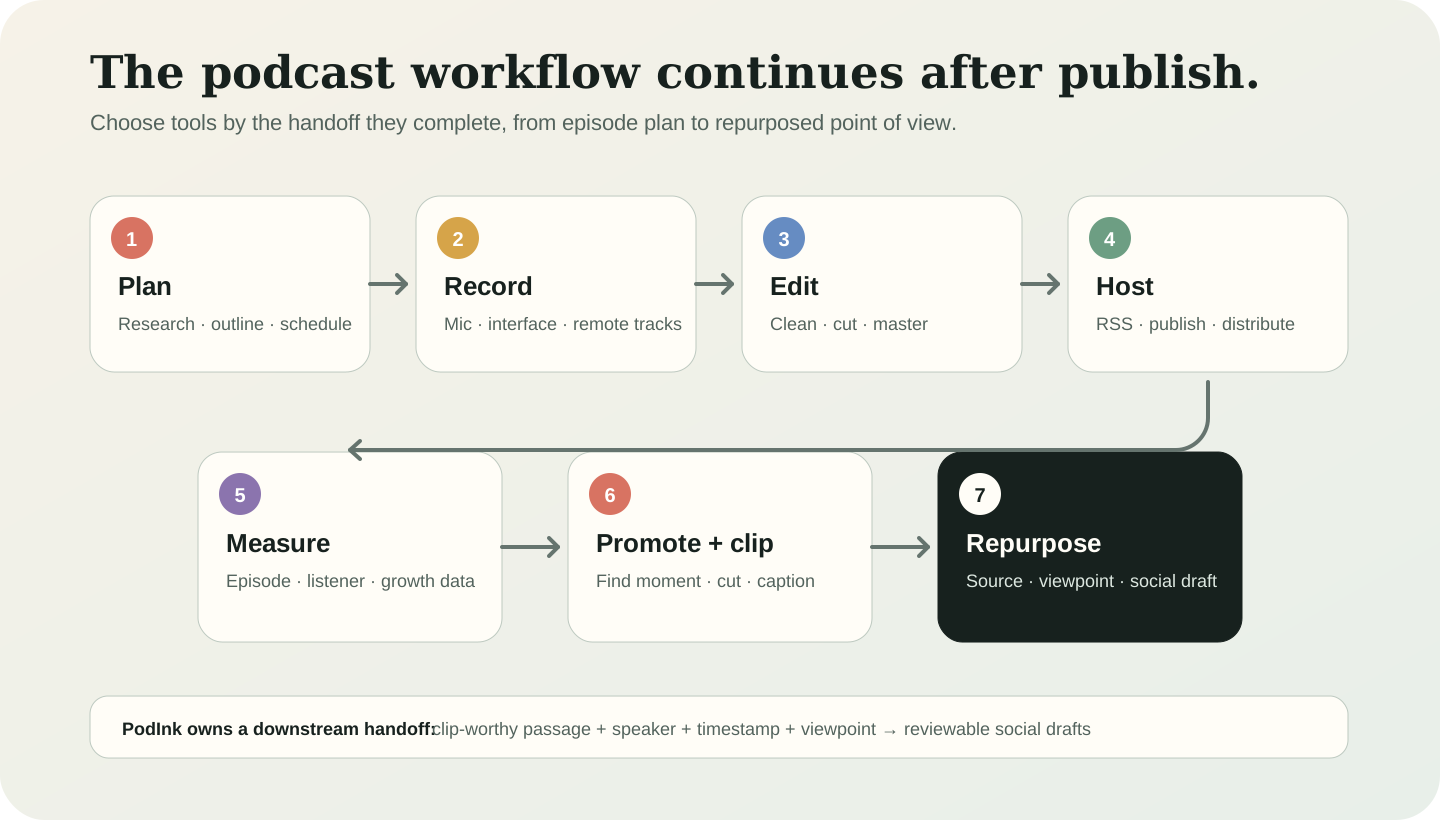
A podcast tool can act before, during, or after production. Compare categories by the artifact they hand to the next stage, not by whether they edit an audio waveform.
| Workflow stage | Output to require | Tool category and PodInk's role |
|---|---|---|
| Plan | A defined episode and guest brief | Research, outlining, and scheduling tools shape the episode before recording.Source: Descript |
| Record | Usable local audio or video tracks | Microphones, interfaces, and remote-recording tools capture the source material. This stage is outside PodInk's scope.Source: PodRewind |
| Edit | A finished episode master | Audio cleanup, transcript editing, and mastering tools prepare the episode itself. PodInk does not edit media.Source: PodRewind |
| Host and distribute | An RSS feed and published episode | Podcast hosts distribute the episode and maintain its feed. PodInk does not host or publish podcast media.Source: Descript |
| Measure | Listener and episode performance data | Analytics tools report how episodes and audiences perform. This stage is outside PodInk's scope.Source: PodRewind |
| Promote and clip | A reviewed moment, then playable social media | Moment-discovery tools identify the passage and timestamp; clip generators and video editors render the media. PodInk contributes to the first handoff.Source: Podwires |
| Repurpose | Reviewable posts tied to the source | PodInk preserves the speaker, timestamp, evidence, and listener viewpoint while preparing separate X and LinkedIn drafts.Source: PodInk |
“A podcast tool stack continues after the episode is published.”PodInk editorial conclusion
Promotion, clip selection, analytics, SEO, and content repurposing are podcast-tool responsibilities because they help an episode reach an audience and produce useful downstream outputs. PodInk owns a specific part of that work rather than the whole stack.
Compare how the approved core changes in the LinkedIn workflow and the X workflow.
Stack checklist
What to verify before adding another podcast tool
- Name the exact artifact the new tool must finish and who receives it next.
- Confirm that source files, speaker labels, timestamps, captions, or export formats survive the handoff.
- Check whether the product creates a draft, exports a file, schedules content, or publishes automatically.
- Test one representative episode through the complete stack before buying overlapping subscriptions.
- Remove a tool when its output duplicates another stage without reducing review or handoff work.
Product boundaries
What a podcast tool stack does not guarantee
- No single podcast tool stack fits every show; choose by the next output your workflow cannot produce reliably.
- Vendor and affiliate roundups may favor products they sell or promote, so test one representative episode before committing.
- A clip-worthy timestamp is part of a podcast clip workflow, but it is not yet a playable audio or video file.
- PodInk helps with source review, clip-worthy moment discovery, and social writing; it does not record, edit, host, render, or publish podcast media.
Human review remains necessary. No repurposing workflow can turn weak evidence into a strong claim.
FAQ
Frequently asked questions
What podcast tools do I need?
Most workflows use tools for recording, editing, hosting, analytics, promotion, and repurposing, but the smallest useful stack solves the bottleneck you have now. Choose tools by the artifact each stage must hand to the next.
Do podcast tools only help produce the episode?
No. Promotion, clip selection, analytics, SEO, and post-publish content repurposing are also podcast-tool responsibilities because they help the episode reach an audience and produce additional useful outputs.
Is a podcast clip tool part of the podcast tool stack?
Yes. A podcast clip workflow includes moment discovery, context review, timestamp handoff, media cutting, captions, framing, export, and distribution. Different tools may own different stages.
Does PodInk edit or host podcasts?
No. PodInk helps with source review, clip-worthy moment discovery, and source-grounded social writing. It does not record, edit, host, render, or publish podcast media.
Evidence