
Podcast workflow guide
AI podcast tools for social posts and clips
Choose AI podcast tools by the output you need: a finished recording, a searchable transcript, an audio or video clip, or a reviewable social post. A clip generator and a social-writing tool solve different jobs, so the most useful stack may contain both.
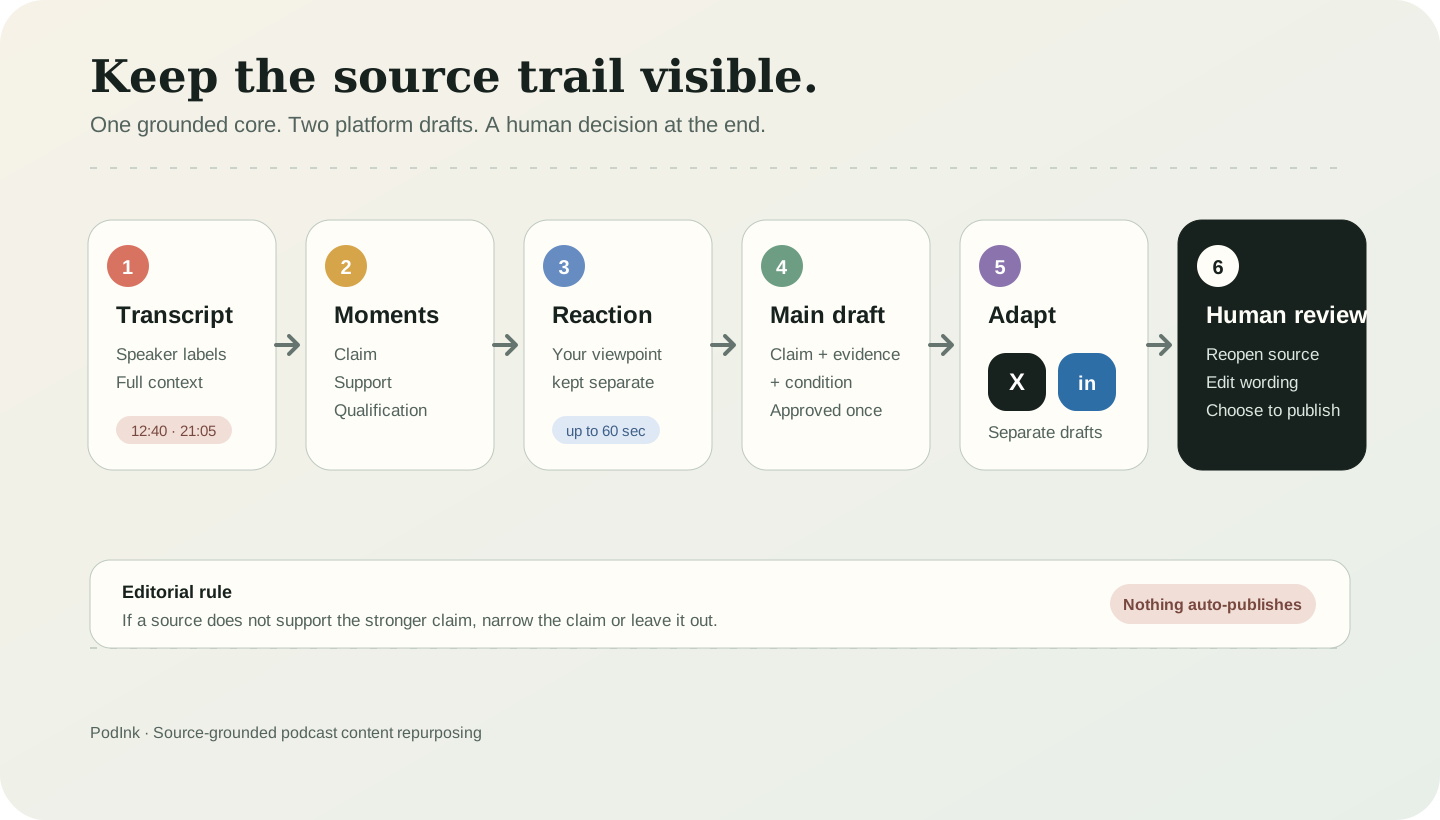
PodInk works in the source-to-writing stage. It keeps podcast passages, speakers, timestamps, and your reaction connected while preparing separate X and LinkedIn drafts. PodInk does not cut or export audio or video podcast clips.
Buying method
How to choose an AI podcast tool without buying overlapping features
Name the final file or draft
Decide whether the workflow must finish with MP4, MP3, SRT, a transcript, show notes, an X thread, or a LinkedIn post. The phrase AI podcast tool is too broad to make that decision for you. Source: Descript's tool-category guide.
Separate clips from written posts
A podcast clip is playable audio or video, often with captions. A social post is written copy that explains, quotes, or reacts to an episode moment. Judge these outputs with different criteria. Source: Descript's podcast clips generator.
Check the handoff between stages
A useful tool should preserve what the next stage needs, such as a timestamped transcript for writing or a captioned video file for publishing. Avoid paying twice for the same intermediate output. Source: Riverside's podcast editing comparison.
Inspect the source trail
For written claims and quotations, verify that the workflow keeps the speaker, timestamp, and surrounding passage available. A polished sentence is not enough if you cannot reopen its source. Source: PodInk methodology.
Separate generation from approval
Confirm whether the tool creates a draft, exports a media file, schedules a post, or publishes automatically. Test one episode end to end before committing the workflow to a team. Source: Castmagic's clip workflow.
Output map
Which type of AI podcast tool do you need?
Match the tool category to the output that must exist at the end of the stage. The same transcript can feed several stages, but the outputs are not interchangeable.
| Workflow stage | Output to require | Typical tool category |
|---|---|---|
| Record and clean up | A finished audio or video episode | Recording and transcript-based editing tools prepare the episode itself.Source: Riverside |
| Transcribe and locate | Speaker labels, timestamps, and searchable passages | Transcription and source-review tools make the recording findable and reviewable.Source: Descript |
| Create podcast clips | An exported audio or video snippet with captions | Podcast clip generators and video editors create playable media for short-form feeds.Source: Castmagic |
| Write social posts | A draft shaped for X or LinkedIn | Source-grounded writing tools preserve attribution and prepare platform-specific copy for review.Source: PodInk |
“A clip generator and a social-writing tool solve different jobs.”PodInk editorial conclusion
If you need both outputs, use a clip tool to create the playable media and a source-grounded writing workflow for the caption, X post, or LinkedIn argument. Do not describe a timestamp suggestion or text quotation as a finished podcast clip.
Compare how the approved core changes in the LinkedIn workflow and the X workflow.
Buying checklist
What to verify before choosing a podcast tool
- Write down the exact final output: MP4, MP3, SRT, transcript, show notes, X thread, or LinkedIn post.
- Confirm that the transcript retains speaker labels and timestamps when the output contains claims or quotations.
- Check whether the product creates a draft, exports a file, schedules content, or publishes automatically.
- Review the selected context before publishing, even when a model labels a moment as the strongest clip.
- Run one representative episode through the entire stack before paying for overlapping features.
Product boundaries
What an AI podcast tool may not deliver
- Vendor pages describe their own products, so test the promised output with one real episode before buying a plan.
- A playable podcast clip does not guarantee that a written caption preserves the speaker's meaning or level of certainty.
- A social post draft is not an exported audio or video clip, even when both outputs start from the same transcript.
- PodInk prepares source-grounded X and LinkedIn drafts; it does not cut or export audio or video clips.
Human review remains necessary. No repurposing workflow can turn weak evidence into a strong claim.
FAQ
Frequently asked questions
What are AI podcast tools?
AI podcast tools assist with one or more stages of podcast production and reuse, including scripting, recording cleanup, editing, transcription, clip creation, show notes, and social writing. Compare them by the output they finish rather than by the AI label.
Can AI turn a podcast into clips?
Yes. Dedicated podcast clip generators can select moments and export short audio or video segments, often with captions and social aspect ratios. Review the selected context before publishing.
Does PodInk create podcast clips?
No. PodInk does not cut or export audio or video clips. It uses podcast moments, timestamps, and optional listener reactions to prepare reviewable social-media drafts.
Can one podcast tool create clips and social posts?
Some suites advertise both outputs, but they should still be tested separately. A good video clip does not guarantee accurate written attribution, and a good social draft is not a playable media file.
Evidence