
Source-grounded guide
How to turn a podcast into social media posts without losing context
Turn a podcast into social media posts by keeping every idea attached to its speaker and timestamp, adding your own reaction separately, approving one reusable main draft, and only then adapting it for X or LinkedIn.
The final step is a human source check and manual publishing decision. This keeps the source, your viewpoint, and each platform version distinct.
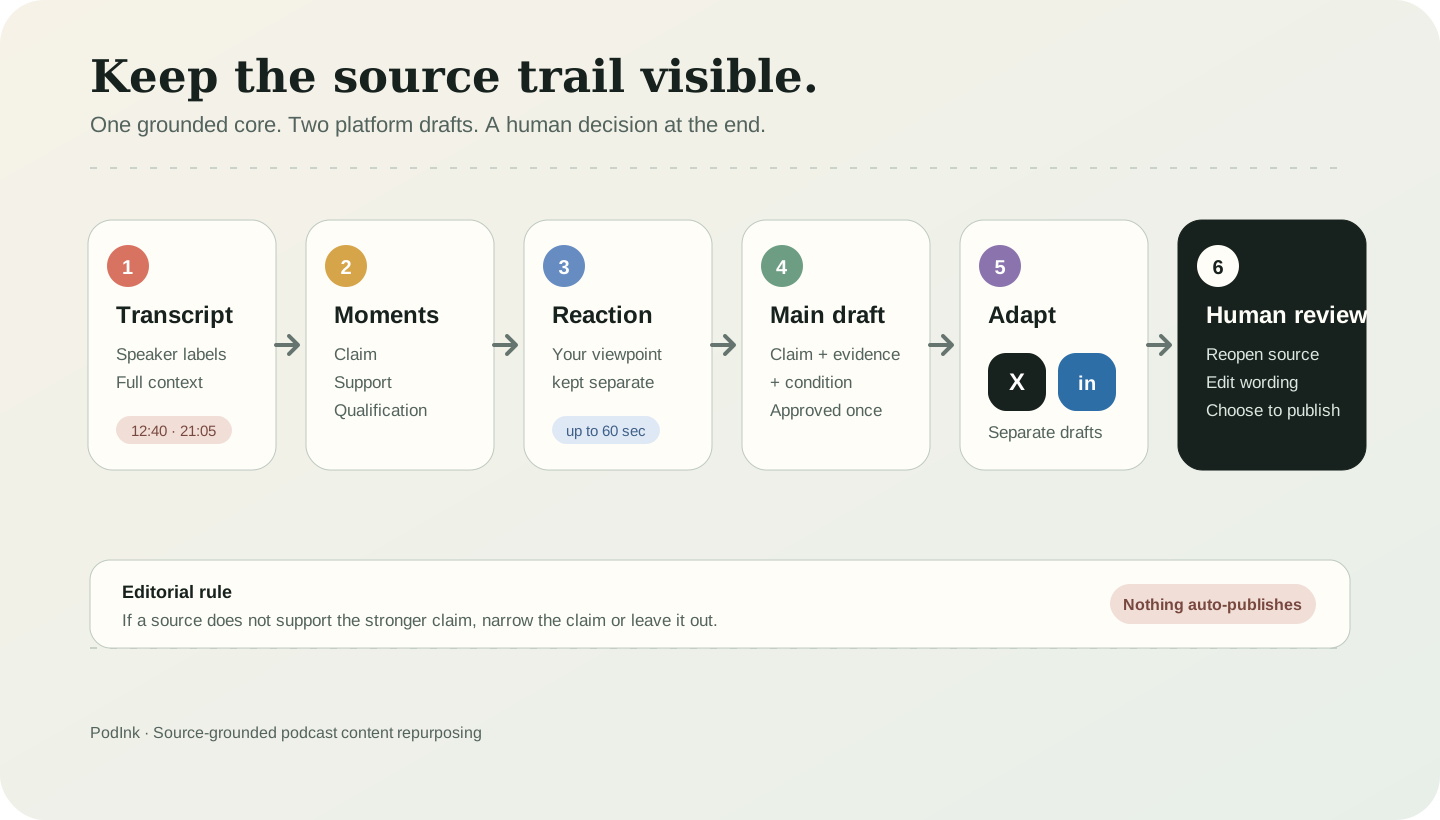
The method
The six-step, source-grounded workflow
Preserve the source
Start with the full transcript, speaker labels, and timestamps. Do not begin with a clip or an isolated quote because the surrounding passage may qualify the apparent claim.
Mark candidate moments
Save three to five passages that carry a clear claim, example, tension, or qualification. Reopen enough context to decide what each passage actually supports.
Add your reaction separately
Write or record what the moment made you think. In PodInk, a voice reaction can be up to 60 seconds. Keeping your viewpoint separate prevents it from being misattributed to the podcast speaker.
Build one main draft
Combine the claim, evidence, qualification, and takeaway in a platform-neutral draft. Resolve source questions before platform formatting begins.
Adapt for each platform
A LinkedIn post needs enough context for a standalone argument. An X thread needs a clear opening claim and a sequence. They should share an approved core, not identical wording.
Review and publish manually
Reopen timestamps for quotes, names, and numbers. Confirm which ideas belong to you and which belong to the speaker. PodInk prepares drafts; it does not auto-publish them.
Worked example
A reproducible example
This is an illustrative workflow, not a customer result. Imagine an 86-minute episode about remote work. Four prepared markers give the draft a claim, support, counterexample, and qualification.
| Source marker | Editorial role | What carries forward |
|---|---|---|
| 12:40 | Main claim | The speaker argues that visible decisions reduce coordination drag. |
| 21:05 | Support | A written owner lets another time zone act without another meeting. |
| 33:10 | Counterexample | A written decision can still fail when authority is ambiguous. |
| 41:20 | Qualification | The practice helps most when the decision and its owner are both explicit. |
“Remote work is a tax on ambiguity.”Your illustrative reaction
The main draft can keep that point, the source support, and the condition together. The LinkedIn version can expand the argument; the X version can sequence it. Both remain drafts until you review them.
Compare how the approved core changes in the LinkedIn workflow and the X workflow.
Editorial gate
What to verify before a draft becomes a post
- For a direct quote, reopen the exact timestamp and compare every word.
- For a paraphrase, check that the speaker's meaning has not become stronger or more certain.
- For names, numbers, dates, or product claims, verify the original passage or a primary source.
- Label your interpretation as your interpretation.
- If the evidence is incomplete, narrow the claim or leave it out.
Boundaries
What this workflow does not solve
- A transcript can contain recognition errors, incorrect speaker labels, or missing visual context.
- A timestamp shows where wording came from; it does not prove that the speaker's claim is true.
- Compressing a passage for a social platform can change its meaning, so human review remains necessary.
Human review remains necessary. No repurposing workflow can turn weak evidence into a strong claim.
FAQ
Frequently asked questions
Should every podcast clip become a social post?
No. Publish only when the passage supports a useful point and the context survives the edit.
Can the same copy be used on X and LinkedIn?
Use the same approved core, then adapt the structure separately. Identical copy usually loses either the context LinkedIn needs or the sequence an X thread needs.
Does PodInk publish automatically?
No. PodInk prepares reviewable drafts and leaves the final publishing action to you.
Evidence