
From a finished draft to a clear decision
A podcast social media approval workflow for the exact draft
A podcast social media approval workflow should attach each decision to the exact text, media, source passage and destination being reviewed. Give a named reviewer a specific question, record approval or the required change, and check the final package before publishing. Reopen the relevant review when an edit changes what the audience will see or believe.
A message that says Looks good leaves a practical question: which version was approved? Use the record below when a writer, editor and publisher handle the same podcast material. A shared document is enough to start; the workflow does not require a paid approval tool.
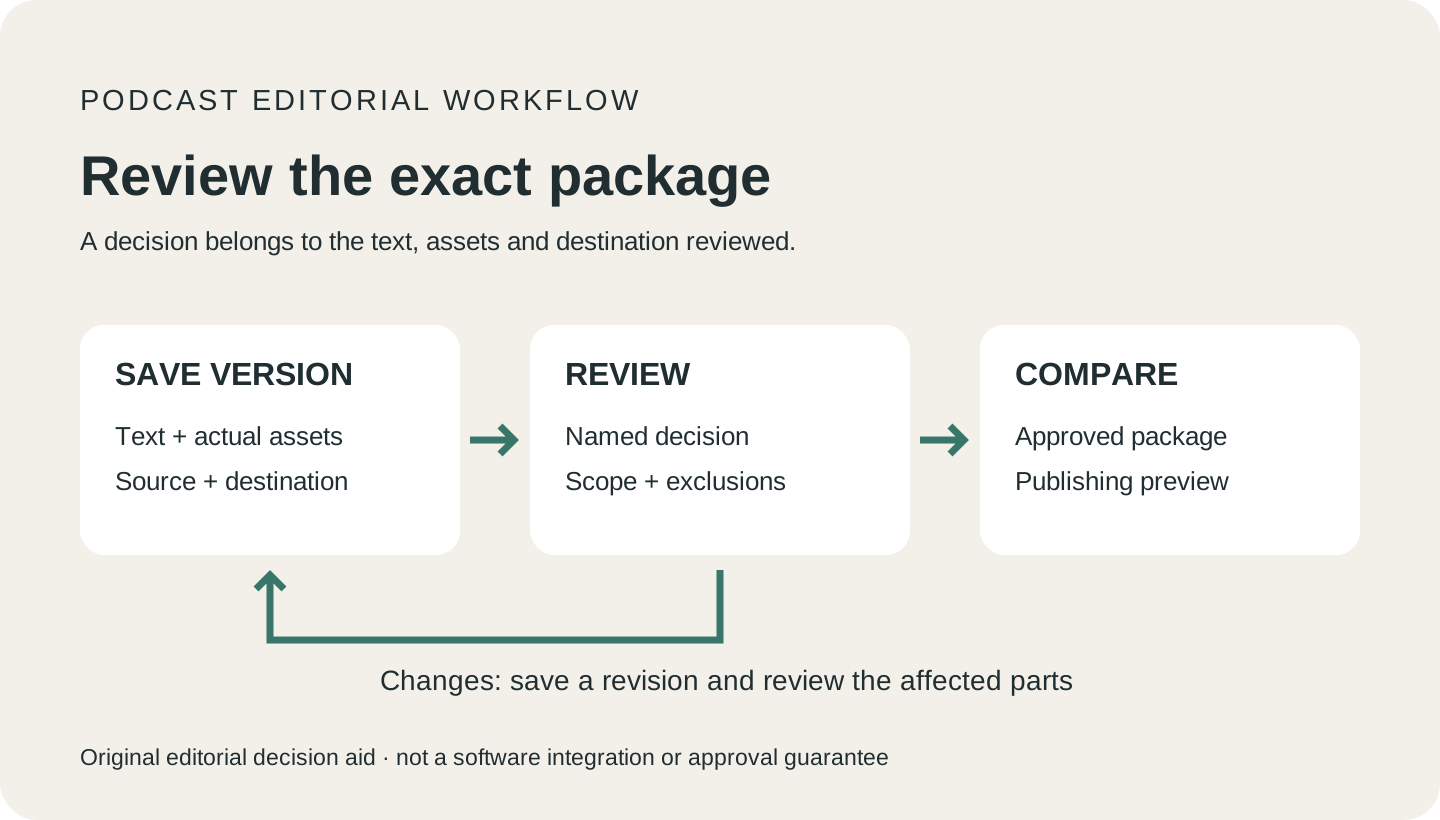
Separate source review, editorial approval and publishing permission
Source review asks whether the post represents the passage fairly. Editorial approval asks whether the finished message serves its reader. Publishing permission identifies who may release that package to a particular account. One person can handle several roles, but the record should still say which decisions were made.
Asana documents separate outcomes for approval, requested changes and rejection. Use that distinction in your own record: a request for changes is work still to do, not permission to publish after an unspecified edit. Source: Asana’s approval and proofing guidance.
A reviewer who checked a transcript has not necessarily checked spoken wording, a video cut, translated captions or a quote card. Name the review’s scope and exclusions. If the intended asset needs an unperformed check, leave that asset on hold rather than treating the text review as approval for everything.
Make the review target recoverable
Save a stable copy of the text with a version label. Attach the actual media, caption or alt text, destination link and source record. Put comments beside the sentence or asset they concern. Keep the reviewed copy even when the shared working document changes.
A small team can use a shared folder and an approval log. Keep the reviewed copy when creating a revision, and link the new version from the log. The version labels in this guide are examples, not a required naming convention.
Buffer’s mobile documentation describes approval actions that also add a post to the queue or schedule it. Check what your chosen tool’s approval button does before using it as an editorial sign-off. Your internal review decision and the tool’s publishing action may be coupled. Source: Buffer’s mobile draft and approval documentation.
Ask for a decision the reviewer can actually make
Replace Please check this with a request such as: Review the attributed paraphrase and its qualification against the linked passage; mark the attached text approved or identify the sentence to change. Send a source reviewer enough surrounding context to assess the claim, not only the promotional excerpt.
Name the writer who will resolve comments and the person who may publish. Add a reviewer for a specific decision that needs that person’s knowledge or authority. List specialist checks separately so an unresolved check has an owner.
If a required reviewer is unavailable, hold or reschedule the package, or use a previously designated alternate with the needed authority. A deadline passing is not a review decision. Hootsuite’s documented workflow likewise distinguishes approval from expiry when required approval misses the scheduled time; your own tool may behave differently. Source: Hootsuite’s approval sequence.
Copyable approval record
Keep this record beside the draft
Fill this in for one publishable package. Leave the decision pending until the named reviewer has assessed that version. Do not copy an example approval as your own.
APPROVAL RECORD — BLANK
Package ID and version:
Writer / person resolving comments:
Reviewer and decision requested:
Channel, account and intended audience:
Exact text snapshot:
Media file/version, captions and alt text:
Destination URL and visible call to action:
Source URL, speaker and passage locator:
Required context and claim boundaries:
Evidence checked / checks still pending:
Decision: pending / changes requested / rejected / approved for the stated scope
Reviewer, decision time and reason:
Approved scope and explicit exclusions:
Revision after review: what changed / affected check / new decision:
Person authorized to publish and intended slot:
Composer check: visible text, media and destination match the approved package?
Published URL and publication time, or reason held:
Review workflow
Move the same package from review to publication
Prepare the whole package
Start from a complete draft with its source record. Include the actual image or clip when the post depends on it. Mark missing evidence before assigning review so the reviewer does not have to discover that the central asset is unavailable.
Request a scoped decision
Give the reviewer the stable version, source passage and specific question. Keep editorial comments separate from an approval record. A helpful suggestion about the hook does not necessarily answer whether the attributed claim is accurate.
Resolve changes in a new version
Make the requested edit and record the changed sentence or file. Return the revised package for the affected review. If approval was conditional, show how the revision meets the condition and have the designated person record that it is resolved.
Compare the composer with the approved package
Before release, compare the actual text, media, caption, account and destination with the approved snapshot. Check link previews and line breaks where they change what a reader sees. A copied draft is not proof that the final composer contains the same package.
Record publication or the reason for holding
Save the public URL only after confirming the post exists. If publication fails, retain the approved package and note the failure. If the retry requires new wording, media or a changed time-sensitive claim, return those changes to review.
Illustrative handoff
The text passed review, but the quote card changed
Fictional teaching example. An editor reviews a post about a proposed team practice. No real podcast quotation, guest approval, tool test or campaign result is represented.
The writer has an attributed paraphrase of a guest’s tentative suggestion and a separate sentence describing the writer’s own application. The review covers the text only. A designer later adds a card, creating a new package to assess.
| Package | Decision and reason | Next action |
|---|---|---|
| Text A | The editor approves the attributed paraphrase and its stated limitation for the named account. The decision explicitly excludes media. | Retain Text A and its source record. Do not infer approval for an asset that was not included. |
| Text A + Card A | The card presents the writer’s application in quotation marks under the guest’s name. The full post still attributes the original paraphrase correctly. | Hold the combined package. The card introduces a false impression that the guest said the writer’s words. |
| Text A + Card B | The designer labels the card as the writer’s takeaway, removes the false quotation treatment, and includes the important limitation. | Send Card B with Text A for review of the combined message. The reviewer decides whether the visible result is fair. |
| Approved package in composer | The publisher checks that the approved card, text, account and destination are the ones loaded. | Publish only within the granted scope; save the public URL after confirming the result. |
The useful distinction:
“An approval of the text does not silently approve a different message created by the image.”PodInk editorial recommendation
The return to review is caused by a change in attribution and meaning. Calling the card a design change would hide that issue. The combined post needs a decision even though the body text itself did not change.
The example does not require starting every check again. The source passage can remain the same while the reviewer checks the new visual wording, attribution and its relationship to the body. Record that scope so the publisher knows which package the decision covers.
The finished handoff contains an approved package and a recoverable decision, not a general promise that all future derivatives are ready. A later translated caption, shortened claim or replacement asset needs its own change assessment.
Compare how the approved core changes in the LinkedIn workflow and the X workflow.
Changes after review
Decide what an edit requires you to check again
| Change after approval | What to examine | Suggested next action |
|---|---|---|
| Spelling or punctuation | Could the edit change a name, number, attribution or the sense of a sentence? | Record the correction. Follow your agreed minor-edit policy; return meaning changes to the relevant reviewer. |
| Shorter hook or new headline | Did a qualification disappear, or did a proposal become a promise? | Recheck the claim against the source and approve the revised wording. |
| New image, quote card or captions | Does the asset add a claim, quotation or speaker assignment? | Review the combined package, including any recording check needed for the new use. |
| Different account or language | Is the new audience or translation within the approved scope? | Request approval for the changed use and any language-specific review. |
| New link or later publishing slot | Does the destination still deliver the promised action? Is the claim still current? | Check the new destination and time-sensitive statements before scheduling. |
- The reviewed text and assets can be recovered as a specific version.
- Each reviewer has a named decision and access to the relevant source.
- Requested changes have a responsible person and a visible resolution.
- The approval states its destination, scope and remaining exclusions.
- Changes after approval have been assessed and any required re-review is complete.
- The publishing preview matches the approved package; publication is recorded separately.
Evidence boundaries
What this workflow establishes
- The approval record, change rules and worked handoff are original editorial recommendations, not a measured team process or a guarantee against mistakes.
- Vendor documentation supports the descriptions of the named workflow features. No Buffer, Asana or Hootsuite workspace was configured or tested for this guide.
- No recording, guest permission, legal clearance or published social post was reviewed. Editorial approval does not establish any of those checks.
- The public PodInk demo linked below illustrates a source map. This guide does not claim that PodInk provides team approval, scheduling or automatic publishing.
Human review remains necessary. No repurposing workflow can turn weak evidence into a strong claim.
FAQ
Frequently asked questions
Does an approved podcast post cover every platform version?
Only if the decision explicitly covers those versions and destinations. Keep each adaptation in the review package. A new opening, translation or image can change the meaning even when it comes from the same episode.
Do I need paid software for an approval workflow?
No. You can keep stable draft copies and a decision log in a shared document or folder. Vendor approval features have their own access and plan requirements; this guide does not compare plans or recommend buying one.
What if the reviewer says approved with changes?
Record the condition, make the change in a new version, and obtain a clear decision that closes it. Agree in advance who can verify a routine correction. Do not leave the publisher guessing whether the condition was met.
Is guest approval the same as source verification?
No. A guest can express a preference about presentation without checking every factual claim or asset. Record what the guest reviewed and what the editorial reviewer checked. Obtain any permissions your intended use requires separately.
Evidence
Sources and comparison pages
- Creating, managing, and approving draft posts on the Buffer mobile appBuffer Help Center
- Get from request to deliverable with AsanaAsana
- Approve content before it goes liveHootsuite Help Center