Give readers something useful inside the email
How to turn a podcast into an email newsletter
To turn a podcast into an email newsletter, choose one idea your readers can use, explain it in the email, and link to the supporting episode passage. Write a subject line and preview text that promise that same value, then review the complete edition before handing it to your email publisher.
The worked edition and blank handoff record cover editorial adaptation for an existing newsletter. Subscriber acquisition and sending software are outside the workflow; PodInk is not presented as generating or sending this email.
Choose a reader task before choosing a passage
Start with what the reader should understand or do after reading. A show-notes page can help someone navigate an episode; an email edition needs a reason to be read in the inbox. For this example, the reader is an editor reusing an archive episode and the task is to distinguish a planned event from its later record.
Spotify’s creator guidance describes newsletters as a place to add context and material beyond an episode. We apply that idea here by pairing an archived announcement with a later event report, then giving the reader an editorial check to reuse. This is our teaching adaptation, not a Spotify case study. Source: Spotify newsletter guidance.
Give the edition a purpose beyond reformatting a transcript summary. Select a bounded idea, retain the speaker and source context, and explain why that idea matters to these readers. If several unrelated ideas compete for the subject line, choose one or develop separate editions.
Let the subject and preview text make the same promise
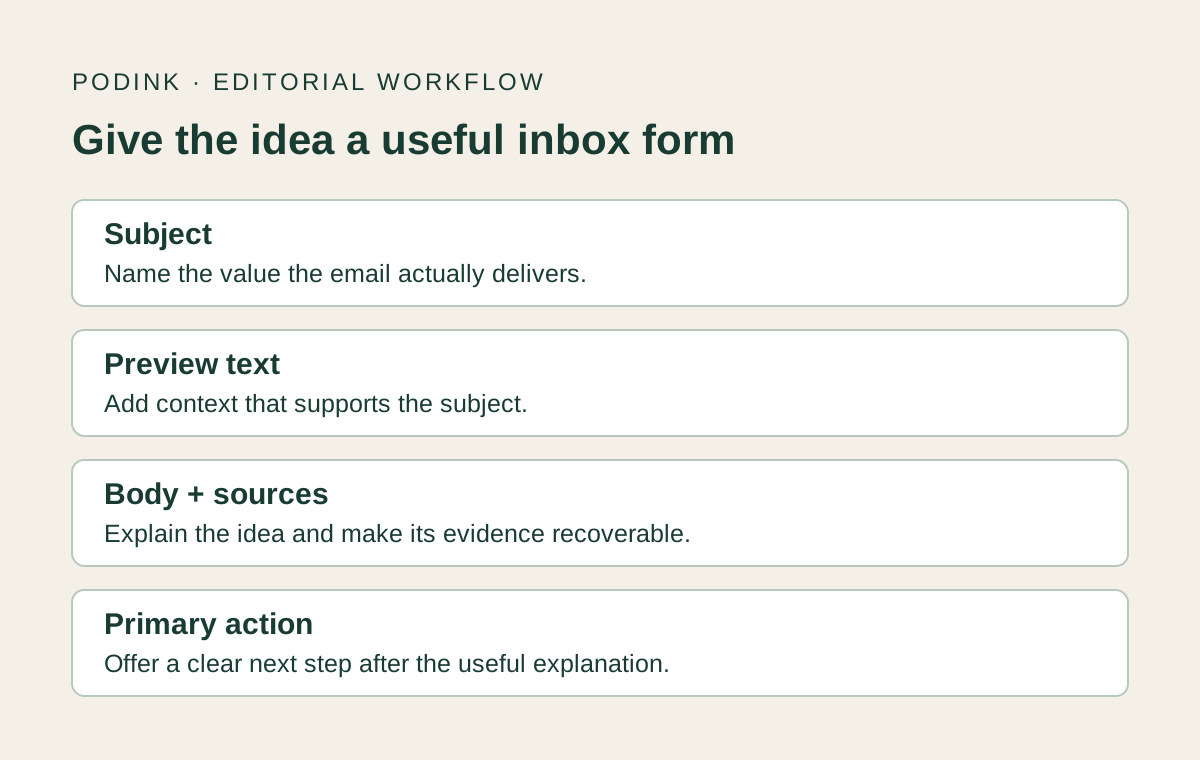
Write the body first, then describe the value it actually delivers. Mailchimp’s style guide treats subject, preview text and body as distinct parts of a newsletter and recommends concise copy with a clear action. Here, the subject names an archive-checking task; the preview explains the distinction the body will demonstrate. Source: Mailchimp newsletter style guide.
Mailchimp explains that preview text appears alongside the subject in an inbox. If it is not set, a client can take text from the start of the message instead. Set it deliberately in your publishing tool, then inspect the inbox view: a footer instruction or “view in browser” line would not explain this edition’s value. Source: Mailchimp preview-text documentation.
Subject length and open rates are not established by this writing exercise. In an actual email preview, check what remains visible when the subject or preview is shortened. Keep the important distinction early, and remove claims the body cannot support.
Make the source recoverable without hiding the useful part
Use attribution in the relevant paragraph and give the source link a descriptive label. The example below uses the official transcript’s closing announcement as its locator. No recording timestamp is supplied because the audio was not checked.
The email has one primary next action: open the episode and transcript. It also has an evidence link to the event report. A source link lets readers check the claim; the primary action offers the next step. Keep the roles clear so readers can either use the lesson immediately or inspect its basis.
For a direct guest quotation, verify the wording, speaker and surrounding context under your publication’s policy. This teaching email paraphrases source records and labels its advice as the editor’s recommendation. It makes no claim to be a NASA email or an account of a real subscriber campaign.
Read the complete editorial edition
Teaching example — original PodInk editorial copy for editors. Not sent, not endorsed by NASA or ESA, and not presented as a guest quotation. The block below is the complete editorial content; your sender identity, subscription controls and other provider requirements remain outside this writing exercise.
Subject: Before you reuse an archive episode, check the event date
Preview text: A launch announcement and a launch record answer different questions.
Hello editors,
An old episode can be accurate about what was planned and still be the wrong evidence for what eventually happened. Before reusing its announcement as a historical result, open the later event record.
In NASA’s December 14, 2021 Curious Universe episode, the closing announcement by Noelia Gonzalez says Webb’s launch was set for December 22. That is an announcement of a plan. Source: Read the episode and transcript.
ESA’s launch report records liftoff on December 25, 2021. That supports a different sentence: when the launch actually happened. Keep the earlier announcement intact and identify it as a plan when you reuse it. Source: Check the event report.
Our editorial recommendation: label the old date as a plan, use the event report when describing the completed launch, and save both links with your draft. This keeps the distinction visible to the next editor.
For your next archive draft, ask: am I describing what was announced, or what happened? If the sentence claims a result, find the record of that result before approving it.
Open the episode and transcript. Find Noelia Gonzalez’s closing announcement immediately before the production credits. Source: Open the episode and transcript.
— PodInk Editorial
Copyable edition handoff
Hand over the exact text and its review record
Copy these fields into your editorial workflow. Save the record with the exact draft your publisher will review.
EDITION / VERSION / DATE:
READER / SINGLE USEFUL TAKEAWAY:
SUBJECT:
PREVIEW TEXT:
COMPLETE BODY, INCLUDING SOURCE LINKS:
PRIMARY NEXT ACTION / DESTINATION:
SHOW / EPISODE / SPEAKER OR ANNOUNCER:
SOURCE PASSAGE / TRANSCRIPT LOCATOR / VERIFIED AUDIO LOCATOR IF AVAILABLE:
LATER RECORDS / WHAT EACH SUPPORTS:
SOURCE CLAIMS VS EDITORIAL INTERPRETATION:
RECORDING CHECKED / TRANSCRIPT ONLY / OPEN QUESTIONS:
INBOX AND BODY PREVIEW / DEVICE OR CLIENT / RESULT:
LINKS OPENED / CORRECT DESTINATIONS:
PUBLISHER / FINAL VERSION / DECISION / REMAINING CHECKS:
From episode to edition
Build and review one edition
Define the edition’s job
Name the reader, the one takeaway and a primary next step. Our teaching edition serves archive editors; it does not attempt to recap Webb’s mission or promote every resource about it.
Collect a small evidence packet
Save the relevant passage, its speaker label and a usable episode link. Add later evidence if the proposed sentence describes an event that had not happened when the episode was recorded.
Write an email that delivers the idea
Explain the useful distinction in the body, then show how the reader can apply it. Keep your recommendation separate from the source’s statement. Let the episode link offer depth instead of carrying the entire lesson.
Align the inbox copy
Write the subject and preview against the finished body. Read them together: they should add information rather than repeat each other or promise a broader result.
Review the actual publishing draft
Paste the edition into your chosen email tool, check its inbox and body previews, and open each link. Record the exact version and remaining checks. No email-tool preview or delivery test was performed for this teaching example.
A complete teaching email
Inspect the example as an editor
The review below checks the complete archive-editor email against its stated purpose. It assesses written content, not campaign performance.
| Part | Editorial choice | Check |
|---|---|---|
| Subject | Names an archive-checking task | The body demonstrates that task with an announcement and an event report. It does not promise a full mission history. |
| Preview | Adds the plan/result distinction | It supports the subject without repeating its wording. Check the subject and preview together in your email tool’s inbox preview before sending. |
| Body | Explains a usable check before the action | A reader can apply the plan/result question without clicking. Both factual paragraphs identify their sources. |
| Next action | Opens the episode with a text locator | The transcript locator identifies the closing announcement. It is not an audio timestamp or a claim of listening. |
Review question
“Would this email still help the reader if they did not press its main button?”Original PodInk editorial review question, not a guest quotation
For this example, yes: the body explains the difference between a planned date and an event record, then gives a question to apply to another draft. The link remains useful for checking the source rather than unlocking the whole answer.
A misleading alternative would be “The complete story of Webb’s first science.” This edition does not cover that story. Keep the narrower subject, or do the additional reporting and write a different edition before using the broader promise.
Approve the subject, preview, body and destinations together. Changing one can reopen the review even if the underlying episode stays the same.
Compare how the approved core changes in the LinkedIn workflow and the X workflow.
Repair the mismatch
Check the inbox promise against the body
| Mismatch | Why it matters | Repair |
|---|---|---|
| Subject promises a full episode summary | The email covers one announcement. | Narrow the subject to the actual lesson; do not add a rushed summary to justify the headline. |
| Preview repeats the subject verbatim | The second inbox field contributes no new context. | Use it to name the distinction or practical benefit delivered in the body. |
| Body requires a click to explain the idea | The reader has received a teaser without the promised lesson. | Add the useful explanation, then offer the episode for context or verification. |
| Edited body no longer supports the action | The saved approval refers to a different edition. | Recheck subject, preview, body and destination as one version. |
- Does the edition have one clear reader task?
- Does the body deliver what the subject promises?
- Does preview text add context and survive the chosen inbox preview?
- Are source statements distinct from your interpretation?
- Can an editor reopen the supporting passage from the supplied links and locator?
- Were the final inbox view, body and destinations checked in the publishing tool?
Scope of this example
What has and has not been checked
- This is an original teaching edition based on official text. No email was sent and no audience, open-rate or conversion result was measured.
- The NASA transcript and ESA report support the bounded plan/result comparison. NASA and ESA are mission partners; these are not independent audits of the mission.
- No recording was reviewed. The example uses a transcript locator and does not supply a verified audio timestamp.
- An email client, sending provider, screen reader and subscriber workflow were not tested. A readable web copy does not establish email compatibility.
- PodInk’s prepared source-review demos do not generate, send or approve this email edition.
Human review remains necessary. No repurposing workflow can turn weak evidence into a strong claim.
FAQ
Frequently asked questions
Should a podcast newsletter summarize the whole episode?
Only if that is the edition’s purpose. A focused edition can explain one useful idea and point to the episode for more context. Match the subject to the scope actually covered in the body.
How is this different from podcast show notes?
Show notes can help someone browse or revisit an episode. This newsletter edition delivers a focused lesson in the message itself, with inbox copy and a clear next action. It retains links for readers who want to inspect the source.
Do source links break the one-action approach?
No. A supporting source link helps verify a factual statement; the primary next action tells the reader what to do next. Keep those roles clear and avoid unrelated offers that compete with the edition’s purpose.
Can I send the example exactly as shown?
Treat it as editorial teaching copy. Before any real send, adapt it for your readers, recheck the evidence and complete your provider’s publishing requirements. This guide has not tested inbox rendering, delivery or subscriber controls.
Evidence
Sources and comparison pages
- The creator’s guide to making a show or podcast newsletterSpotify for Creators
- Writing Email NewslettersMailchimp Content Style Guide
- About Preview TextMailchimp
- Webb Space Telescope: Go for Launch with ESA ExpertNASA Curious Universe
- Webb liftoff on Ariane 5 to unlock secrets of the UniverseEuropean Space Agency