
Podcast caption review
How to check podcast clip captions before posting
To check podcast clip captions, compare the text with the recording, then inspect timing and readability in the delivered video. Save the exact media and caption versions with the decision. A corrected text draft alone cannot establish that the clip is ready.
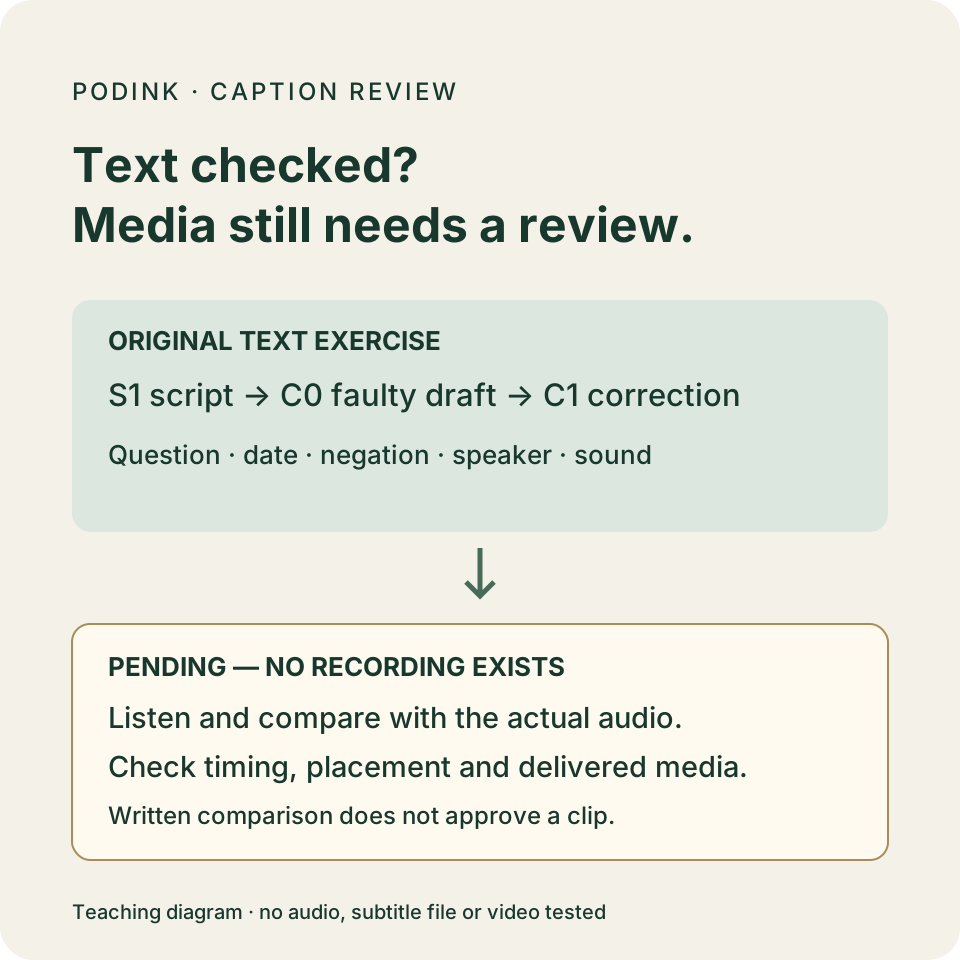
Start with the original exercise below: a script, deliberately faulty caption text and a corrected text draft. The exercise has no recording. Use it to practice spotting wording errors, then leave the media checks pending until there is a real file to play.
What are you checking?
W3C describes captions as text aligned with audio, including speech and the sounds needed to understand it. A transcript can help prepare that text; it cannot establish alignment with an unseen recording. Source: W3C captions guidance.
YouTube warns that automatic captions can misrepresent speech, including when pronunciation, accents or background noise cause problems. Its guidance asks creators to review and correct the text. A generated track is a starting point for review. Source: YouTube automatic caption guidance.
The steps and C-01 record below are an editorial review method. They are not a claim that PodInk transcribes, edits, exports or approves captions.
Review wording and presentation as separate tasks
W3C transcription guidance says to represent what was said accurately and avoid inserting extra explanations into captions. It recommends breaking a long sentence at a logical phrase. Keep an editorial setup outside the speaker’s caption text. Source: W3C transcription and line-break guidance.
W3C’s explanation of prerecorded captions includes speaker identification and meaningful sounds. It also says captions should not cover relevant video information. Review identity, sounds and placement with the actual clip. Source: W3C prerecorded caption explanation.
YouTube documents text and timing edits separately. Its help page says editing automatic captions creates a new track with the revisions. Save the track version in your review record; that recordkeeping step is an editorial recommendation. Source: YouTube caption editing guidance.
Copyable caption review record
Leave the next reviewer a checkable record
Use these fields for your own clip. Keep each untested item marked pending so the next reviewer can see what remains.
EPISODE / SOURCE LINK / SELECTED PASSAGE:
RECORDING / CUT VERSION:
CAPTION LANGUAGE / FILE OR TRACK VERSION:
REVIEWER / DATE / REVIEW SCOPE:
WORDS / NAMES / NUMBERS / NEGATION: checked / revise / pending
SPEAKER AND MEANINGFUL SOUND CUES: checked / revise / pending
TIMING / LINE BREAKS / VISIBLE PLACEMENT: checked / revise / pending
EXPORT / PLAYER / VIEWING SIZE CHECKED:
ISSUE / LOCATION / BEFORE / AFTER / RECHECK RESULT:
REMAINING UNKNOWN / RESPONSIBLE PERSON:
PUBLICATION DECISION / PERSON / DATE:
Caption review
Keep the caption and media checks separate
Pair the source and the caption draft
Open the selected recording and its intended caption track. Save the episode link, passage, media filename and caption version together, so a corrected track cannot be mistaken for approval of another cut. Preserve the earlier files.
Listen while reading the caption text
Play the passage and mark text mismatches. Pay close attention to names, dates, quantities and words such as not or may. Replay an unclear passage; leave an unresolved word open instead of guessing from the surrounding story.
Check who and what the text represents
Check speaker changes and meaningful sounds. Keep questions, qualifications and editorial comments distinct from statements attributed to the speaker.
Inspect timing and readability
Check captions start and end with corresponding speech. Inspect phrase breaks and placement in the muted clip; keep relevant picture details visible.
Review the delivered file
Reopen the actual export with its intended caption track. Inspect the intended viewing size with player controls visible, including the destination preview when available. Save the reviewer, file version, unresolved issue and publication decision. If a file changes, repeat the affected checks.
Original text exercise
A draft date becomes an approved launch date
S1, C0 and C1 are original teaching texts written for this guide. HOST and EDITOR are roles in the exercise; Mira is a fictional review contact. No interview, speech-recognition service or recording produced these lines. The ringing phone is a scripted cue, not an observed sound.
S1 — complete original script:
HOST: Is the launch on 15 May? EDITOR: No. The fifteenth is a draft date. Mira has not approved it. [phone rings] HOST: Let’s pause while I silence that.
C0 — complete faulty caption draft, written deliberately for this exercise:
HOST: The launch is on 50 May. Mira has approved it. HOST: Let’s pause while I silence that.
| Check | Faulty draft | Decision |
|---|---|---|
| Date | 50 May | S1 asks about 15 May. Compare the given text; do not infer a different real date. |
| Question and reply | The launch is on… | C0 turns the host’s question into a statement and drops the editor’s No and draft-date qualification. |
| Negation and identity | HOST: …Mira has approved it. | S1 gives the editor the words has not approved it. C0 changes both the speaker and the decision. |
| Sound cue | No cue before the pause | S1 includes a ringing phone that explains the pause. Carry the scripted cue into C1; actual sound identification remains untested. |
Editorial takeaway:
“A missing not is easy to overlook when the sentence still reads smoothly. I would pause this draft before it becomes a launch announcement.”Original editorial takeaway, not a podcast quotation
C1 — complete corrected caption text for comparison with S1:
HOST: Is the launch on 15 May? EDITOR: No. The fifteenth is a draft date. Mira has not approved it. [phone rings] HOST: Let’s pause while I silence that.
C1 restores the script’s text and role labels. This page presents script turns for comparison, not timed caption cards, an SRT or VTT file, or a recommendation to fit the editor’s full turn on one line.
C1 is a corrected text exercise. No listening, timing, player-layout or exported-video check has been completed. A future recording would need comparison with C1 even if the performer followed S1.
Compare how the approved core changes in the LinkedIn workflow and the X workflow.
Filled caption record
C-01: text compared; media review still pending
| Saved item | Result | Unresolved work |
|---|---|---|
| Source and versions | S1 script; deliberately faulty C0; corrected C1, all printed above. | No episode URL, recording, caption file or export exists for this exercise. |
| Text comparison | C1 matches S1, including the question, draft-date qualification, negation, role labels and scripted phone cue. | This result concerns written text, not what someone said or what a listener heard. |
| Timing and layout | Pending. No timestamps or playable media were supplied. | Create and review actual caption segments against the recording; inspect the delivered player view. |
| Review and publication | AI-assisted exercise review on October 17, 2026. C0 rejected; C1 retained for instruction. | Human guide-publication approval was granted on October 17, 2026. No social clip or caption package is approved. |
- Pair the review with the specific recording and caption version.
- Keep unresolved words or speaker identities visible in the review record.
- Inspect the delivered video after edits, not only the text editor.
- Keep the publication decision separate from the text-comparison result.
Evidence boundary
What the written exercise can establish
- No audio, video, caption service, editor interface or upload was tested for this guide. S1, C0 and C1 are original written exercises.
- The workflow is an editorial checklist, not an accessibility conformance audit. A real clip can have additional accessibility needs beyond its captions.
- Official pages support the stated guidance and documented editing features. They do not establish that an unseen caption track is accurate or that a specific player renders it correctly.
Human review remains necessary. No repurposing workflow can turn weak evidence into a strong claim.
FAQ
Frequently asked questions
What if a word is still unclear after replaying it?
Record the passage and the unresolved word. Ask a suitable reviewer to resolve it against the source, or choose another passage. Do not turn a plausible guess into a confirmed name, number or quote.
Evidence
Sources and comparison pages
- Captions/SubtitlesW3C Web Accessibility Initiative
- Understanding Captions (Prerecorded)W3C Web Accessibility Initiative
- Transcribing Audio to TextW3C Web Accessibility Initiative
- Use automatic captioningYouTube Help
- Edit or remove captionsYouTube Help